Thank you for taking part in our study
We are evaluating methods that generate a camera trajectory for a video from a short text instruction (for example, “follow the runner and circle around them to the left”).
Each item shows four candidates (A–D) made by different methods. For every candidate you see two things, one above the other:
- Rendered video — the reconstructed point cloud scene rendered from the generated camera trajectory, so you can see how the camera moves.
- Re-rendered video — the source video re-rendered along the same camera by a video generation model.
You will answer three short single-choice questions per item. There are 10 items; the study takes about 10 minutes. There are no right or wrong answers; please go with your honest impression. Responses are anonymous and used only for academic research.
How to judge
Camera — judge the rendered videos (top row)
Q1. Instruction following
Which camera motion best follows the text instruction? Judge the type and direction of the camera movement.
Q2. Subject framing
Which camera keeps the described subject best framed and visible throughout the shot?
Video — judge the re-rendered videos (bottom row) against their rendered videos and the source
Q3. Video quality
Which re-rendered video looks the most natural and consistent — the fewest distortions or flickering, no people or objects that suddenly appear, disappear, or change shape, and no breakage from the camera passing through objects or people?
White areas in a rendered video are parts of the scene the source video never showed; the video model has to fill them. Filling them is expected — judge whether the result stays consistent with the source scene.
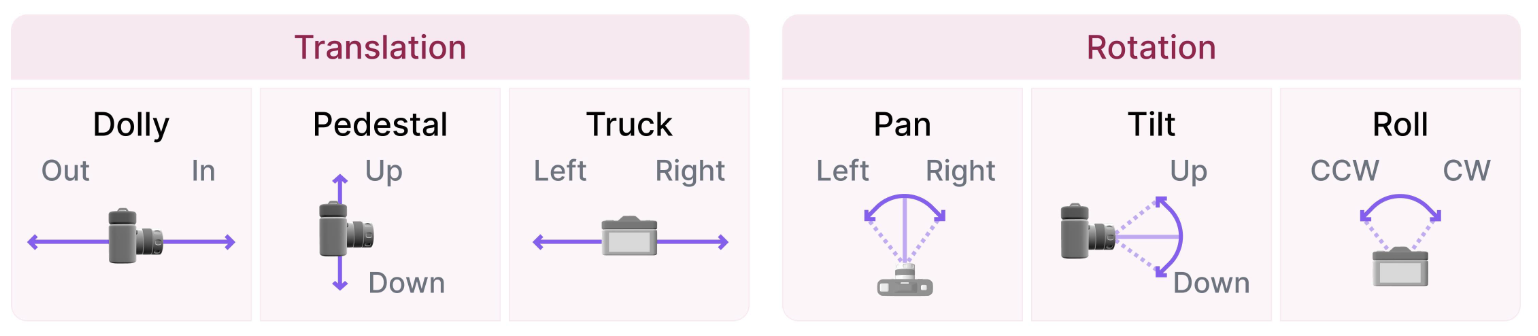
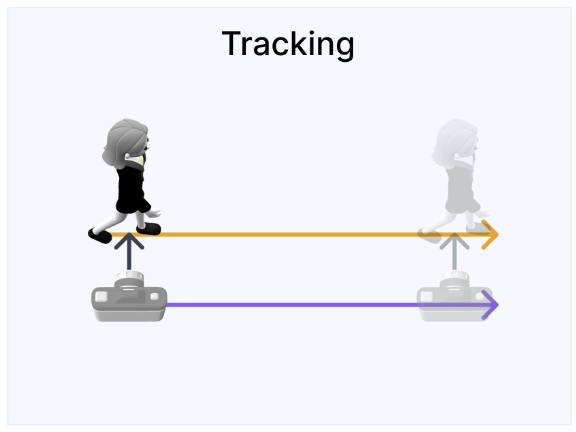
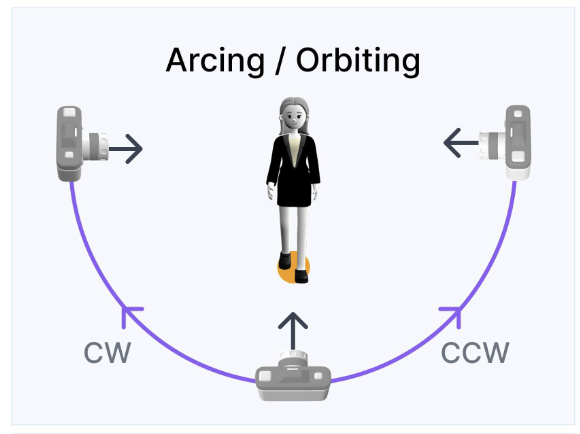
This reference is also shown at the top of every item.
This is what one item looks like. Read the instruction and watch the source video. Then compare the four columns: the rendered video (top) shows each camera, and the re-rendered video (bottom) shows the source video re-rendered along that camera by a video model. Answer Q1–Q2 from the rendered videos and Q3 from the re-rendered videos.
Practice only — choices in this example are not recorded.
All videos on a page play together; press Replay to restart them. On a narrow screen, scroll the candidate row sideways. Your choice is saved as soon as you click, and you can go Back to change it.
Camera movement reference
White areas in a rendered video are parts of the scene the source video never showed; the video model has to fill them. Filling them is expected — judge whether the result stays consistent with the source scene.
Thank you!
Your answers have been saved. You can close this page.
Completion code:
Review your answers
You can reopen any item and change your answers. Your latest choice is the one that counts.